Skip to content

B2B dealer portal

NLink: the digital backbone of your B2B dealer channel

A self-service portal that moves dealer orders from phone calls and messages into a clean flow from order to ERP.

NLink B2B

NLink B2B

A B2B dealer channel is about more than taking orders: it depends on reliable data, speed in the field and visibility for management. When orders are scattered across phone, email and WhatsApp, wrong entries and repeated work pile up, stock is not visible in real time and field notes stay personal or reach the ERP late.

NLink, developed by Nexsol Teknoloji in İzmir, Türkiye, gives manufacturers and wholesalers a single self-service portal for dealers, sales representatives and managers. Dealers place orders without waiting, see the current catalogue and open their account statements instantly. Sales representatives manage field orders based on a shared company memory, and managers approve, revise and monitor the entire B2B order flow from one screen, with catalogue rules and discounts set centrally.

Two-way live synchronisation with NVelox and other ERP systems keeps stock, account and order data aligned between operations and accounting. Multi-tenant architecture, role-based access and audit logging support corporate security needs. Adapters, APIs and webhooks keep the ecosystem open for further systems. Product communication is available in English and German.
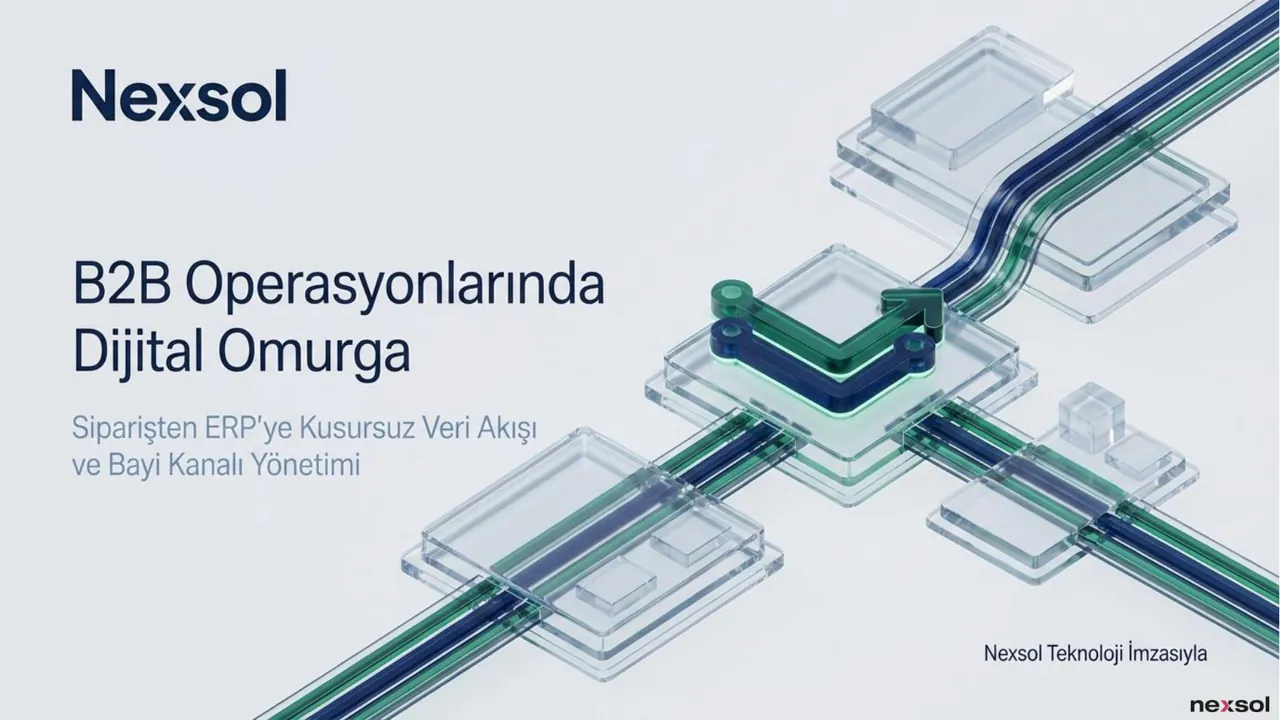
One-portal channel ecosystem

Feature 01

One-portal channel ecosystem

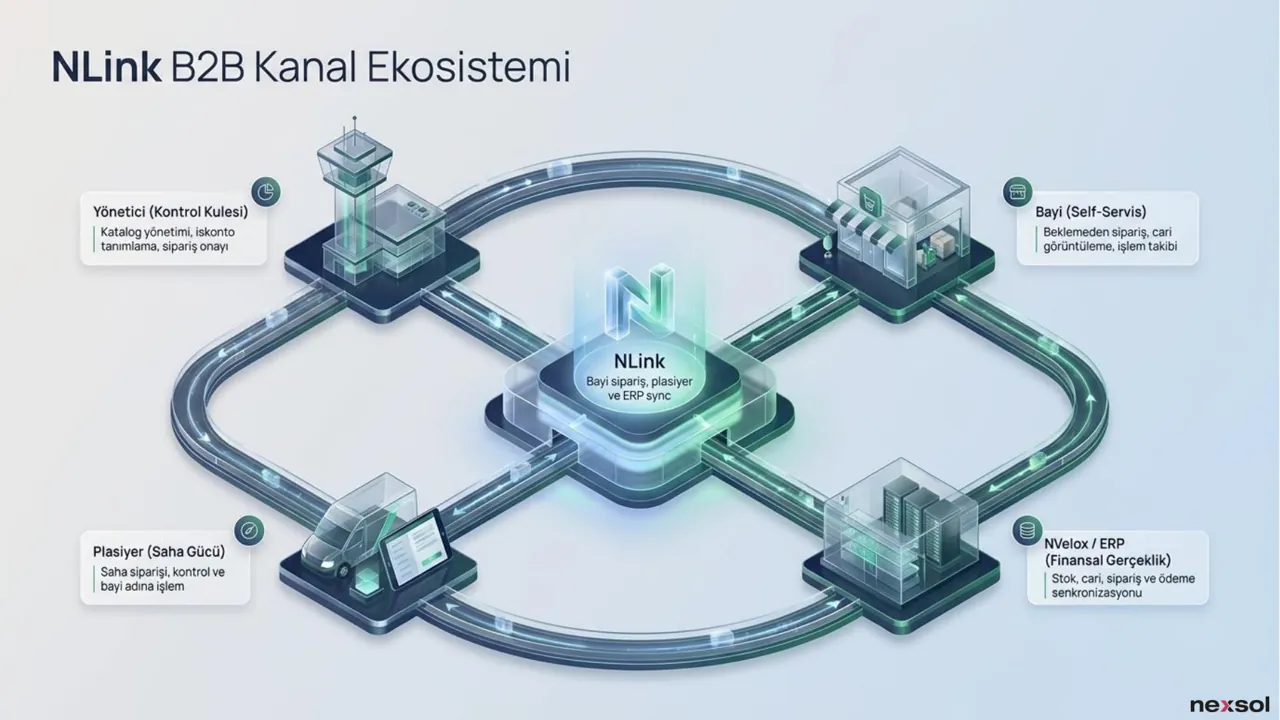
NLink brings dealers, sales representatives, managers and the ERP together on a single B2B channel backbone. Orders, customer accounts and synchronisation are handled in one flow, so everyone works from the same data instead of separate lists and messages.

Dealer portal: self-service and speed

Feature 02

Dealer portal: self-service and speed

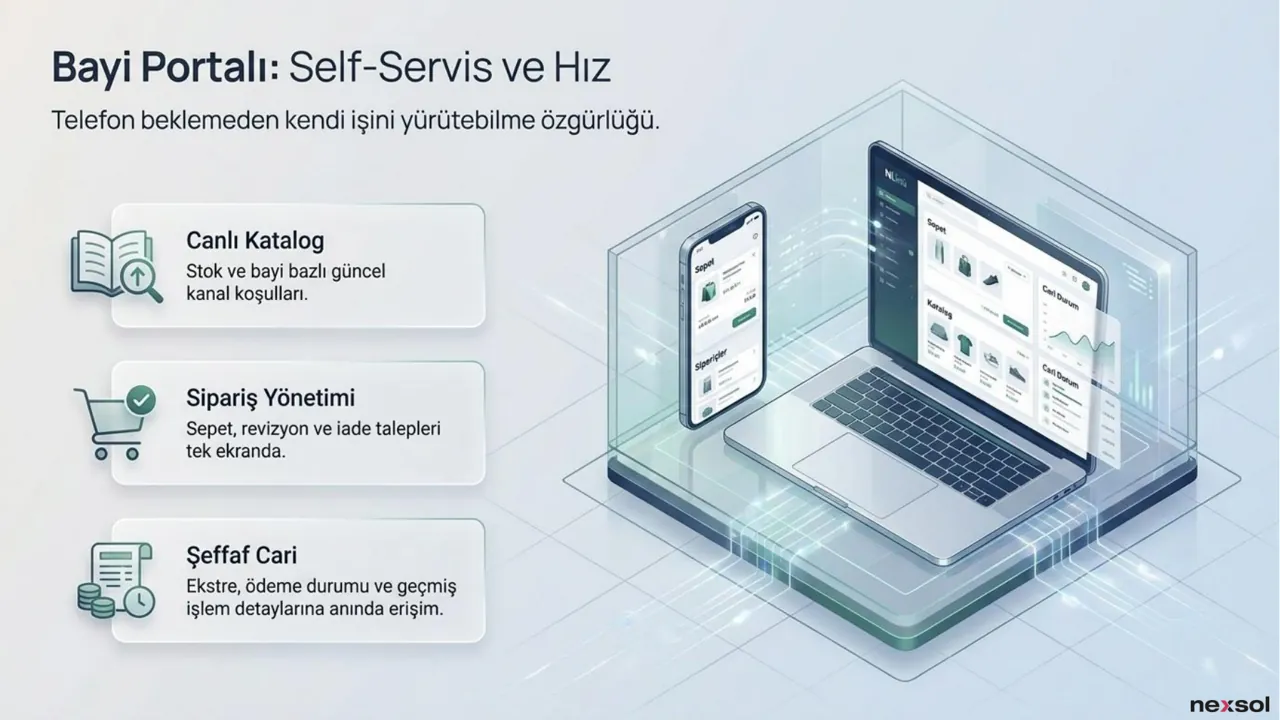
Dealers place orders from a live catalogue without waiting on the phone, manage baskets and return requests on one screen, and see account statements, payment status and past transactions instantly, whenever they need them.

Sales rep panel: agile field operations

Feature 03

Sales rep panel: agile field operations

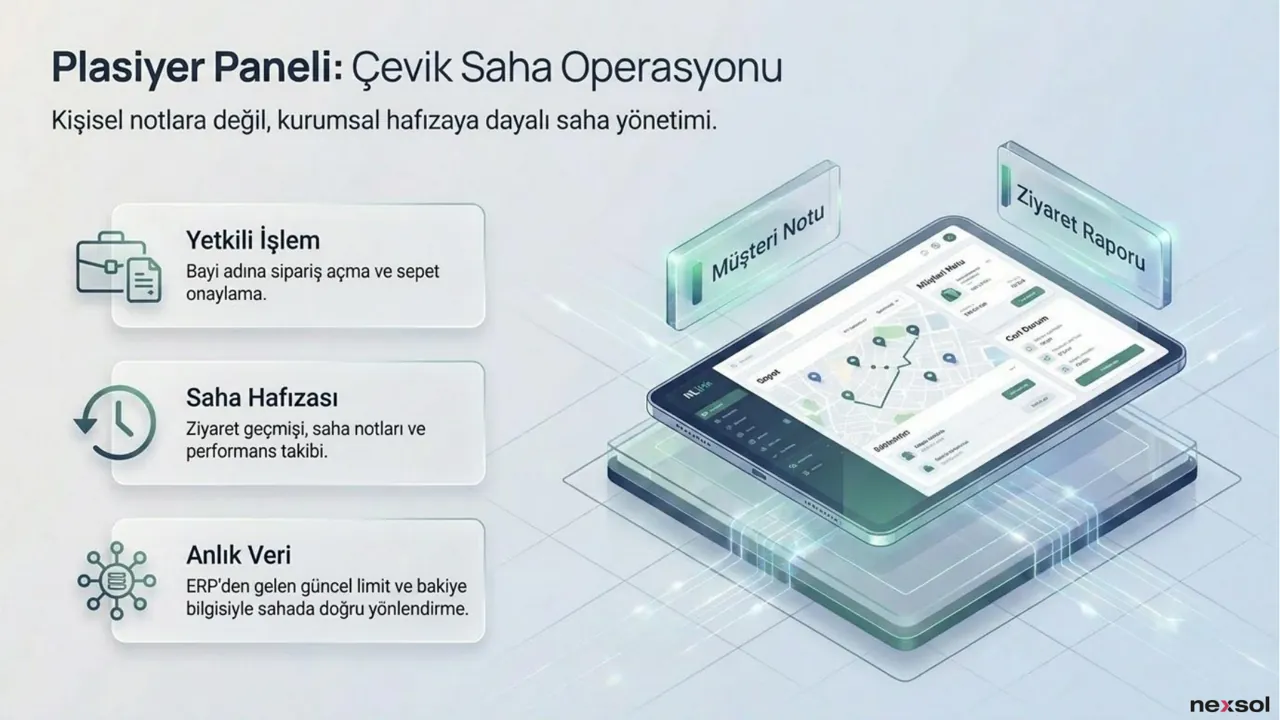
Field teams place orders on behalf of dealers and keep visit history and field notes in a shared company memory. Current credit limits and balances from the ERP help them advise dealers correctly while they are on site.

Manager panel: 360-degree control

Feature 04

Manager panel: 360-degree control

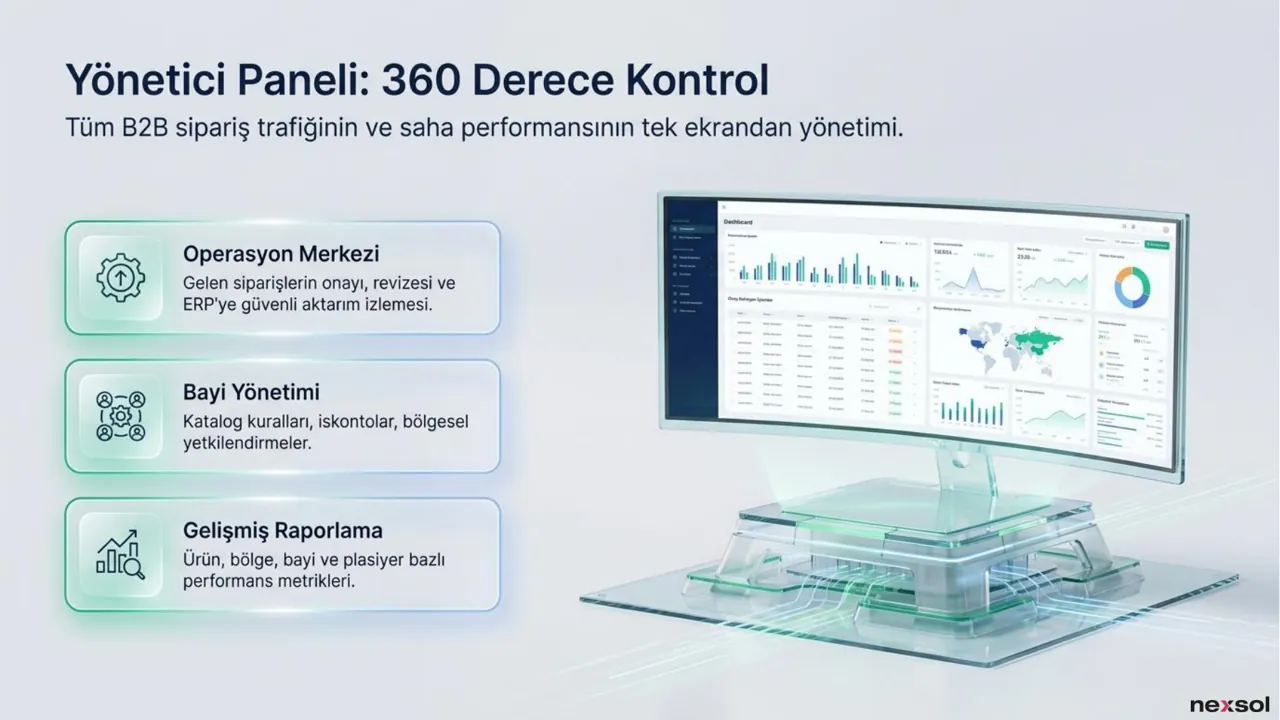
Approval, revision and ERP transfer of all B2B order traffic are monitored from one screen. Catalogue rules, discounts and regional permissions are managed centrally, together with performance reporting for the whole dealer channel.

Seamless data journey from order to ERP

Feature 05

Seamless data journey from order to ERP

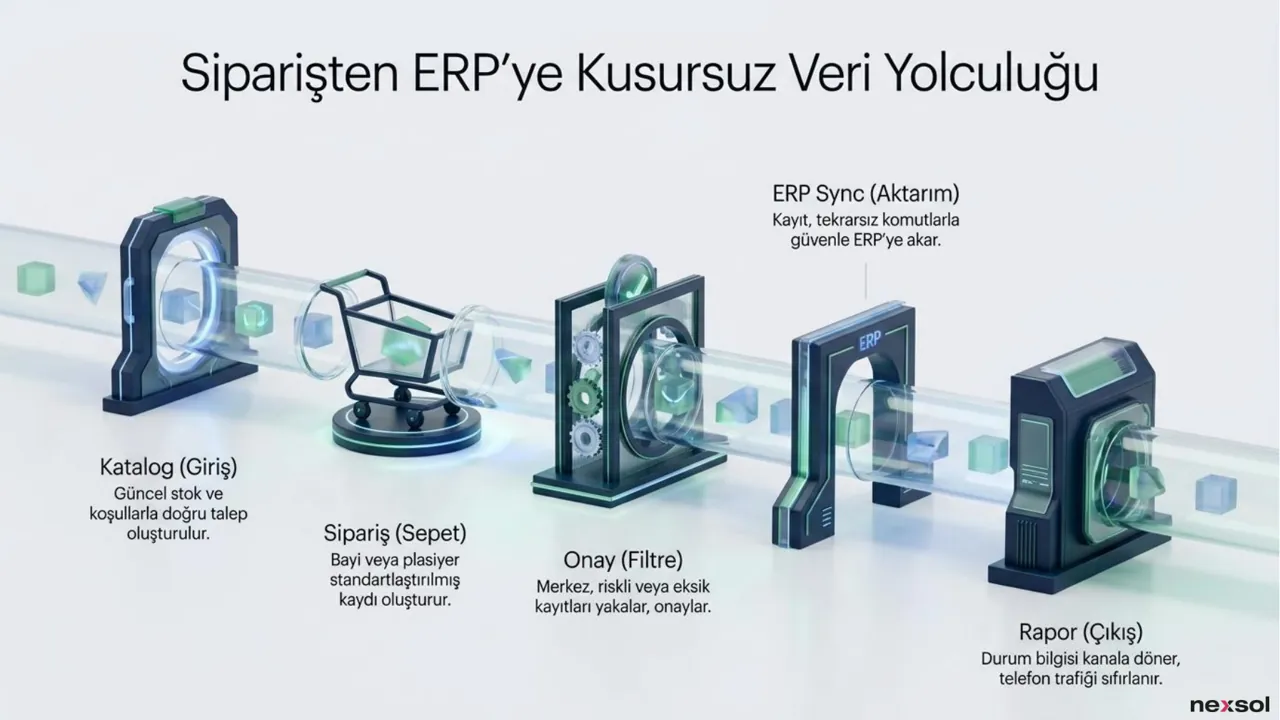
Catalogue, order, approval, ERP sync and reporting steps form one path. Risky or incomplete records are caught at approval, and data flows into the ERP through idempotent commands, so the same order is not transferred twice.

Live sync with NVelox and your ERP

Feature 06

Live sync with NVelox and your ERP

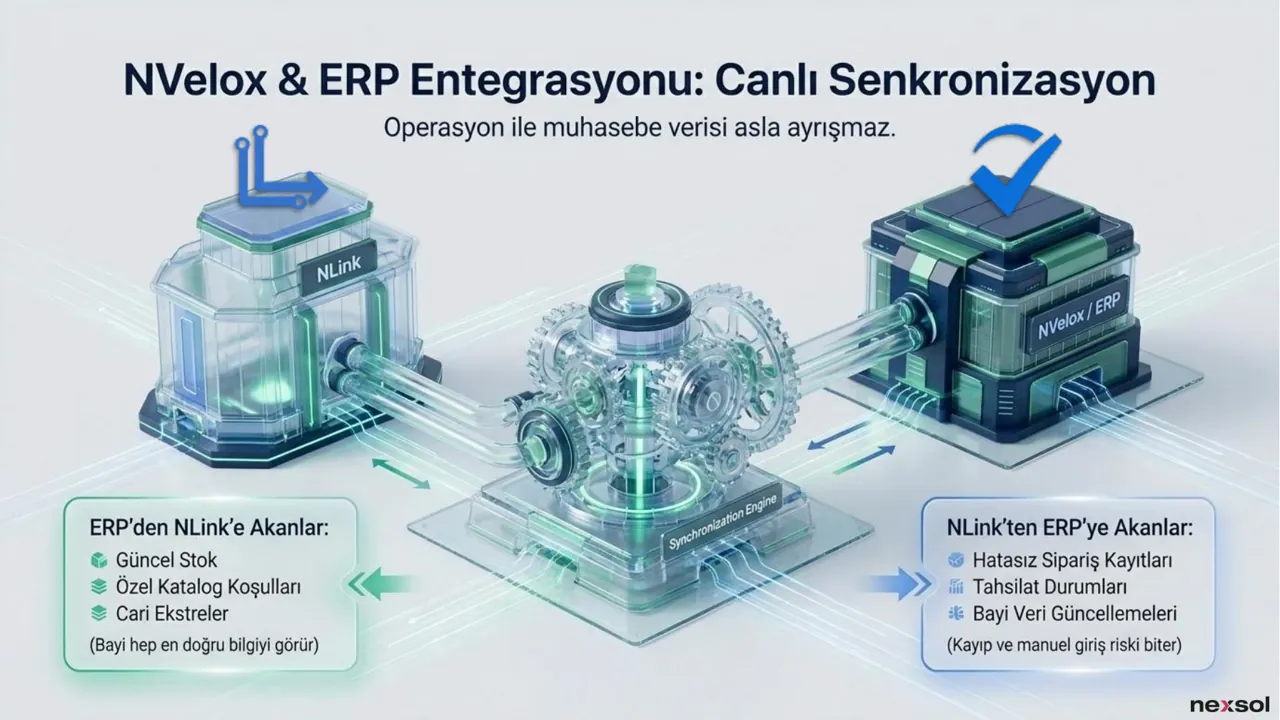
Current stock, dealer-specific catalogue terms and account statements come from the ERP; accurate order records, payment statuses and dealer updates flow back from NLink. Adapters, APIs and webhooks extend the ecosystem to further systems.

Enterprise security, scalable architecture

Feature 07

Enterprise security, scalable architecture

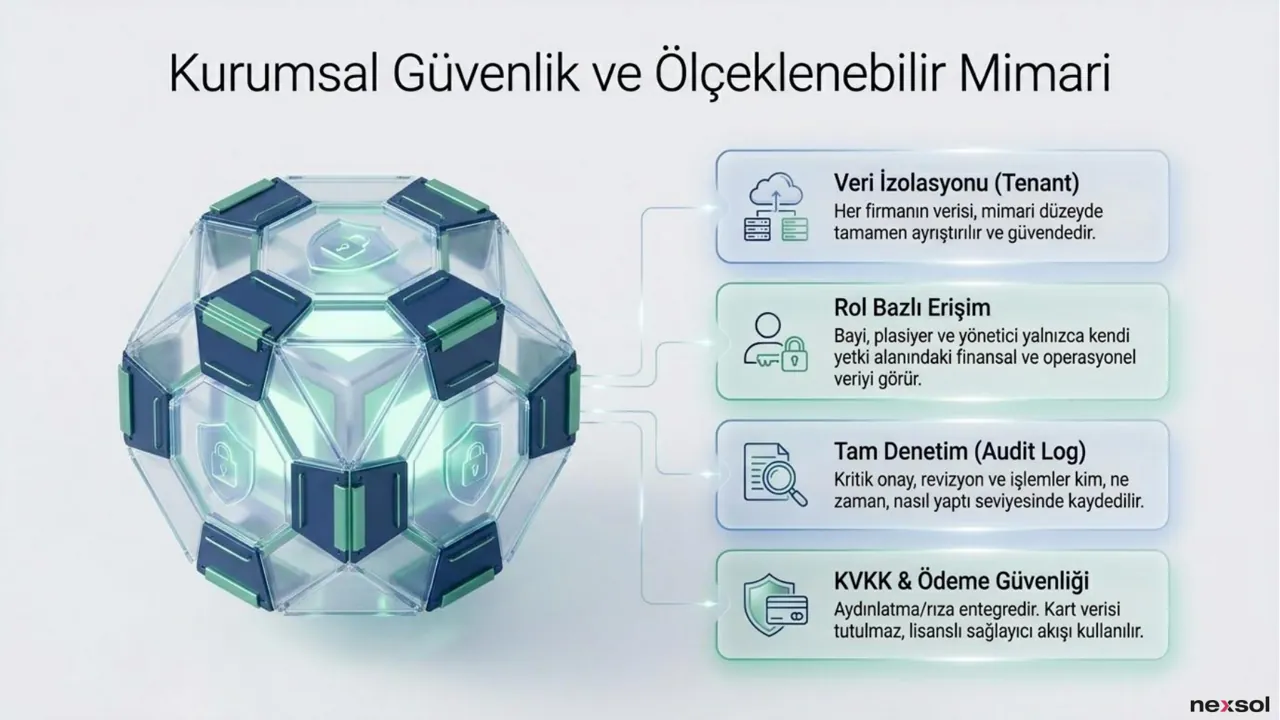
Multi-tenant data isolation, role-based access, a full audit log and a payment flow that does not store card data on the system protect your channel. Each company’s data is separated at architecture level as the dealer network grows.

01

Wholesalers and distributors

For businesses whose dealer orders arrive through many channels, NLink collects every request in one flow and reduces the constant stock and account queries reaching the operations team.

02

Manufacturers with dealer networks

When ERP screens cannot be opened to dealers, NLink provides a dedicated portal with dealer-specific catalogue terms, while the ERP remains the source of truth.

03

Companies with field sales teams

Sales representatives’ visit notes and orders stay with the company rather than in personal notebooks, and they work with live limit and balance data from the ERP.

Frequently asked questions about NLink

DETAILSWhat is NLink?

NEEDS / SOLUTION / APPROACHNLink is a B2B dealer portal that digitises the dealer channel of manufacturers and wholesalers. It brings dealer ordering, field sales operations and ERP synchronisation together on one modern backbone, giving you a clean data flow from the moment an order is placed until it is recorded in the ERP.

DETAILSWho is NLink designed for?

NEEDS / SOLUTION / APPROACHIt is designed for wholesalers and distributors, manufacturing SMEs, franchise suppliers and businesses with field sales teams. It helps wherever orders are spread across many channels, ERP screens cannot be opened to dealers, or field notes become disconnected from the orders they relate to.

DETAILSWhat can dealers do in NLink?

NEEDS / SOLUTION / APPROACHDealers can place self-service orders without waiting on the phone, browse a live catalogue showing stock and their current channel terms, manage baskets and return requests on one screen, and access account statements, payment status and the details of past transactions instantly.

DETAILSHow do sales representatives use NLink?

NEEDS / SOLUTION / APPROACHSales representatives can place orders and confirm baskets on behalf of dealers, keep visit history and field notes in the company’s shared memory, and use current limit and balance information from the ERP to advise dealers correctly. Field knowledge therefore stays with the company, not in personal notes.

DETAILSHow does NLink integrate with an ERP?

NEEDS / SOLUTION / APPROACHNLink sets up two-way live synchronisation with NVelox and other ERP systems. Current stock, special catalogue terms and account statements flow from the ERP into NLink; accurate order records, payment statuses and dealer data updates flow back. Adapters, APIs and webhooks allow the ecosystem to be extended.

DETAILSHow does NLink keep data secure?

NEEDS / SOLUTION / APPROACHNLink separates each company’s data at architecture level in a multi-tenant design. With role-based access, dealers, sales representatives and managers see only data within their own scope, and critical approvals are kept in a full audit log. Card data is not stored; a licensed payment provider flow is used.

Tell us what you want to build or improve. We reply in English or German and start with a short call to understand your goals, systems and timeline.

let's start together

<nexsol />